INNOVATIVE HUMAN RESOURCES STRATEGY -
The overriding theme of this blog is Human Resources from a strategic perspective. This blog looks at current issues facing Human Resources and offers strategic insight needed to create innovative HR leadership for the 21st Century.
I thought this was important enough to re-post this for all in HR I was on vacation in Europe for 2 weeks and had a lot of time to think, design, evaluate, and reset my HR thought process. During that time here is what I came up with, and guess what so did the HR Executive. HR has been denigrated, criticized, scoffed at, laughed at, bureaucratically maligned organization since the 1950's. My guess is that if the current practitioners do not see the writing on the wall they will at some point be out of a job and scratching their heads asking why. Well, let me tell you now that I have an outside view looking into organizations. The have the following key flaws:
they take time away from business from line managers and employees
they still do not understand the business from the inside but try to use business speak as their entry into it
there is really not a clear mission for the group and how it ties to the business
expectations are impossible to say the least
people really do not know what HR people do
the systems and programs that they establish or use are counter to business productivity
people in general do not trust HR people (you know that drill - when they see an Hr person milling around all they can think of is bad news is coming)
employees do not think HR is objective - only a management speaker
what managers and supervisors don't want to handle they send to HR - sound familiar?
I can go on and on but those are some of the salient points I wanted to make. So as I was sailing in the Mediterranean this all came into real focus and I had that "a ha moment". Blow it up and start over in 2012 terms not what has been built up over the last 50+ years and multiple retooling that really did not fix the core problem.
So I will reiterate what Jac Fitz-Enz said in the September issue of HR Executive. Solution, break up HR and restart with four distinct groups:
Governance - this should fall under the CLO
Record Keeping ( Administration) - this should fall under the CFO
Employee Relations - this should fall under the COO or Operations
Strategic Development - this should report to the CEO
From there you that the specialty functions and fit them where they best belong ( comp under the CFO, staffing under the COO etc). In today's real world business environment I feel this is what we should do with HR. I know a lot of you will not agree with this approach since it puts your job in jeopardy but if you really think about it this is a 21st century strategic approach and that is what this blog is all about.
Glide is a new iOS app from the company of the same name. It’s available now as a free download from the App Store, with no additional in-app purchases.
Glide positions itself as “the Voxer of video” — in other words, it aims to offer push-to-talk functionality combined with the ability to broadcast live video and record video messages to be reviewed at a later date. Early impressions of the app seem to indicate that it does an excellent job at both of these tasks, with a few caveats.
At present, Glide requires a Facebook account to log in. The company says that in the near future sign-in will be possible with other services, but for now it is limited to Facebook. This is not an unreasonable requirement for a social app, but in certain territories — notably the U.K. — App Store reviewers have historically been rather resistant and critical towards apps which have Facebook as their sole option for creating an account and/or signing in.
Once into the app proper, Glide has a pleasingly simple interface that follows a lot of the popular conventions of the moment. A pop-out drawer on the left of the screen allows access to information about the app, links to the developers’ social media presences and the ability to contact them directly for support. Another pop-out drawer on the right allows access to the user’s friends list as well as the facility to create new groups and invite friends from Facebook to start using the app. The friends list indicates whether the users are online and whether they are currently broadcasting, watching a video message or typing.
On the app’s main screen, message threads are organized chronologically with relative timestamps. Tapping on a message thread reveals it. Individual messages may then be played back, and the user may “broadcast” to the group at any time by tapping the camera button at the bottom of the screen. If group members are online at the same time, they may watch the user’s broadcast live; if not, it is recorded in the thread for later playback. All videos are stored online and streamed to group members’ devices, so an active Internet connection is required to play back messages. Tapping a button in the upper-right corner of the screen allows the user to add additional friends to a conversation and also to switch between the device’s front and rear cameras as desired. Meanwhile, a “T” button in the lower-left corner of the screen allows for quick text responses to messages that do not really warrant a full video message. The user is notified of these new text messages immediately via a popup message, even while watching other videos.
Glide is an extremely simple app, but this simplicity allows it to concentrate on doing one thing really well. It’s a good solution for sending quick and simple video messages back and forth between two or more people and provides a well-implemented, thoroughly modern means of communication. The only real issues with the app at this present time are the fact it only supports Facebook logins — a fact which is apparently being worked on — and the requirement for an Internet connection to view past video messages. The app positions the fact that all videos are stored “in the cloud” as a selling point, but it would perhaps benefit from the option to cache videos or save specific messages that the user would like to keep handy at all times, even when they do not have a reliable data connection.
I overheard an exchange between a mother and young child at a store the other day. The child was trying to communicate with the mom and the mom said, “The best way to help is be a good listener.” The child began to talk and the mom quickly and ferociously cut her off and said in a sharp, condescending voice, “Oh, you’re already not being a good listener! The best way to help is to be a good listener.” This went back and forth for several minutes with both the mom and the daughter becoming louder and more firm in their response. Finally, the daughter gave up. You know what? No one won.
That’s right. In her zeal to teach her child that the best way to help is by being a good listener, she completely missed the fact that she was NOT LISTENING. Now, I’m not the perfect mom all the time, just about 50% of the time. Seriously, I know that little ones can try your patience. But the point is that we spend so much time trying to teach someone else what is “right” that we don’t do it ourselves. It’s no different in the workplace.
How many times do we see managers telling an employee the same thing over and over only to have the employee do something completely different? How many employees have to come to HR to complain that their manager never listens to them? Then, HR has to try to give recommendations on how to bridge the gap in that conversation. I’d say it’s almost a daily routine. What we need to do is tell managers to start talking less and listen more.
If an employee is not doing something “right”, instead of telling him that the manager could say, ”Hey, I see how you’re doing XYZ. Tell me how that is working for you.”- This allows the employee a chance to say why they do something a certain way, aka have their voice heard. Then, the manager can follow up with something like, “That seems like a good reason. Have you ever thought of doing XYZ to enhance that?” Now you’re in a dialogue and the employee is far more likely to embrace the suggestion.
By taking time to really listen to an employee you will achieve better results in terms of:
Engagement- Employees who have their voice heard and then see those ideas validated will have higher levels of engagement with you and the department.
Teaching and Coaching- When you listen to the employee, you have a greater chance that you can teach them why something is important to handle in a certain way. They will be more accepting of process changes, procedure changes, or other change happening in the department. This is also the way to give them opportunity to voice their concerns and you the opportunity to coach them through it.
Learning- Even the highest level executives are continuous learners. By taking that extra time to listen to an employee, you will definitely learn something. It will spark new ideas, new ways to communicate, help you develop your own skill as a leader, and more.
So, the next time you are coaching your leaders, make sure they understand that by pausing to listen to the employees, they will reap the rewards. What other techniques do you use to convince leaders that listening is one of the most valuable tools they have? Share it in the comments.
Learning to be funny can enhance your communication skill. Most people love a good humorous story. A speaker is always easier to listen to if they can make you chuckle at their story. Unfortunately many people do not have this skill. They attempt to be humorous by telling jokes and end up being humorless. If you want to improve your communication skill learn to be funny, learn to weave humorous stories into your training, your speaking, or your conversations.A growing trend
According to The Herman Trend report, more and more “C-Level executives are embracing the value of going beyond the occasional humorous remark and learning stand-up comedy.” The have learned the teaching and connecting value of making people laugh. I use humor in my presentations, usually by relating something humorous that has occurred in my HR career. After all if something funny or ridiculous has not happened to you in HR then I would be surprised. The ability to relate it to others is where the skill comes in.
Take a class on doing “Stand-up”
I have taken a class on how to do stand-up comedy. I have no aspirations of ever being a professional comedian, but I did learn a lot from that class. I learned that it takes practice to look poised. I learned how to think on my feet in front of an audience. I learned how to handle a heckler (the role played by the instructor). I learned the value of using humor to bond with your audience. A common theme in my class feedback is the attendees have enjoyed my stories and my sense of humor.
Here in the Atlanta area there is a comedian, Jeff Justice, who does corporate training and teaches business people on how to use comedy to accomplish their business goals. I know a number of his graduates and have seen some of them in action. It works. I can recall one individual in particular who was as stiff as a board in his normal presentations. Jeff helped him parlay that stiffness into a humor style that worked for him. Jeff bills himself as the Humor Resources Director, and that title endeared me to him. By the way, I have no relationship with Jeff other than admiration for his work, so this is not a paid commercial.
The value
According to Judy Clark, who was mentioned in The Herman Trend Report, there are five takeaways to learning to be humorous:
Participants learn how to practice light-hearted self-mocking. When we find out what people are saying about us and make light of our own foibles, we take back our power.
Learning how to handle hecklers as stand-up comics, translates into valuable communications skills; they know how to handle difficult people with grace.
Writing jokes together is a creative and bonding experience. “Nobody writes comedy alone,” states Carter; we all need others to help us determine what’s really funny.
People learn it’s OK to take risks—to do things that scare them.
Finally, participants learn how to effectively communicate difficult issues in a way that people will hear it.
So if you want to be a better communicator you may want to think about taking a class on stand-up comedy. You may discover something about yourself.
Many companies have tried to come up with a single service that allows teams to work effectively without email, but former Flickr founder Stewart Butterfield believes he has done it with Slack, which integrates with dozens of different data sources including Twitter
When Flickr co-founder Stewart Butterfield was building an online game several years ago, he and his team of designers and developers built their own hacked-together IRC-based replacement for instant messaging and email as a way of getting things done. After he shut the game down last year and was looking for something else to do, Butterfield decided his workflow software was worth refining, and the result is Slack, which launched to the public today.
If there’s one market that is filled to the brim with competitors — even more so than consumer photo-sharing apps — it has to be workflow or collaboration services. There are large, project-management style suites like Basecamp (which 37signals announced it is now focusing on full time), as well as HipChat, Microsoft-owned Yammer and Salesforce’s Chatter, along with half a dozen others like Asana.
On top of that, many companies and teams use a variety of other services to accomplish the same thing, whether it’s Skype or Google Hangouts. So what makes Butterfield think that he can beat all of these competing solutions? He says no one is approaching the problem in the same way that Slack is — namely, by integrating as many different information providers and pipelines as possible.
“There are three basic types of message: One is a person writing to another person, another is someone trying to send a file, and the third is computers sending you a message — like you have a new follower on Twitter or someone commented on your post. We figured if we could get all three of those kinds of message in one place, there was a chance to build something that would be the one app you have open all the time.”
One ring to rule them all
Butterfield says the need for something like Slack is shown by how quickly adoption has grown: the service launched as a beta “preview” last August, and did no marketing or media relations of any kind, but has continued to grow at double-digit rates week after week for six months. One of the company’s venture backers, Marc Andreessen of Andreessen Horowitz, said: “Growth like this is not something we have seen before. Enterprise software growing 50-80% per month based entirely on word of mouth is unprecedented.”
Butterfield says he didn’t want to build a project-management tool like Basecamp because that inevitably involves philosophical issues about how projects should be managed — instead, he just wanted to put together a single communications tool that would pull in as many different sources of potentially useful information as possible for teams, whether it was chat or automated crash reports.
Slack, which has both an iOS app and an Android app as well as a Mac app, allows team members to easily track messages from co-workers but also to see status reports from across the company, by connecting to tools like SVN, Github, MailChimp, Crashlytics, Heroku and JIRA — things that would otherwise have likely remained in a separate silo or service. An API allows for almost any other service or tool to be integrated into the system as well, Butterfield said.
“We see a lot of people switching from Hipchat or Campfire, but we see an even larger number — an order of magnitude more — coming from nothing. Either it’s a jumble of different services or just email or just Skype, or maybe this group has IRC, this other one uses Hangouts — it’s like a hodgepodge. There is no one service where all the communication goes.”
Ambient awareness of your colleagues
The problem that arises when teams within a company don’t use the same tool, Butterfield says, is that information becomes hard to find, since there is no single repository of all the important data. Teams using Slack “get this kind of ambient awareness of what people are doing. So, for example, the engineers can see what people are tweeting about us, so when we say they’re complaining about this or that they actually take you seriously.”
Butterfield says Slack’s adoption curve is growing faster than Flickr did at any time during its history pre-Yahoo, and is also growing faster than many other workflow-related startups such as Github. The Slack founder said he doesn’t track things like installs or signups because those metrics are “bogus,” but the app is now being used by a wide range of companies from startups like BuzzFeed and Square to large companies like Citrix and Expedia.
True real-time workplace collaboration is something of a holy grail, Butterfield says, in the sense that companies keep promising it will arrive but it never really does — and so teams continue to use email even though it is broken, or mash together various pieces of software to try and make something that works. “There’s a 30-year legacy of broken promises around collaboration, from Lotus Notes on,” he says. “But I feel like now the world is ready for it.”
I had a great discussion with one of my close friends here in Atlanta who is an accomplished executive recruiter and owner of an elite boutique placement firm. We discussed relevance in today's market and how much impact you have if you are not relevant. Well. you have to guess this really got me thinking about my HR blog and me as well. I have been thinking for some time to shut down my blog in May which will be it's 6 year anniversary. Why you ask, well for the reason my friend and I discussed, relevance. I have had the luxury to mentor, guide, and educate people on HR matters, policy, and how to get to the table where HR belongs. I have also been very outspoken about being innovative and creative in the role as well as not just being a business partner but a business person who can run the business. My blog has received 3 years running, 2011, 2012, and 2013 "Best Blog" from the Human Capital Institute. It has been associated with Meet the Boss TV, and written about in Human Resource Executive magazine. I think I have reached the goals I set back in 2007 when I was thinking of doing a blog. That being said, after leaving my former company in 2007, I have consulted with small start-ups, large corporations, done due diligence as a sub-contractor but have not been directly involved with a business full time since that time. I think I have imparted lots of relevant knowledge through my blog but as the dynamics of HR and business change I really am not in the forefront anymore; on the outside looking in so to speak. For those reasons, I will shut my blog down in May 2014 and hope that it has provided you with valuable information and insight into the role HR should play in business today. I will continue to post relevant information until May and hope that you will continue to read my blog until then and refer to it thereafter. Thank you for reading InnovativeHRstrategy and I wish you all the great success you deserve in HR.
There is a great article in Fortune magazine this month (February 3, 2014, go to Fortune.com) about hiring top talent. The most interesting thing about the article is not the hiring of top talent which has been a mantra for HR for many years but how they are hired. The article indicates that most HR executives have been blindsided by people looking for jobs using their mobile devices and not the traditional new wave of using the website. 82% of the 1,000 job seekers surveyed by Glassdoor.com said they expected to use their mobile devices during idle time to look for jobs. HR get readjusted and make sure you are not on the long end of this trend. Candidates want things on the palm of their hand, not a laptop or desktop anymore.
A cluttered hard drive can be disorderly and slow, but it can also be a security hazard. This is especially true of any software on your PC that you rarely, if ever, use. Perhaps you installed a free demo, or you completed a game and you’ll never touch it again.
Chances are good that the software you’re not actively using isn’t being patched and kept up-to-date, which means it may leave your PC vulnerable to exploits.
Just as you regularly remove expired jars of mayonnaise and uneaten leftovers from your refrigerator (right?), any time is a good time to rid your PC of useless and unwanted programs. It never hurts to clear out old data files you’ll never need again, too. Here are some tips to help you purge all that dreck from your PC.
Unused applications
In Windows, go into the Control Panel, look under Programs, and click Uninstall a program. A window will display a list of all the applications installed on the PC. By default the list is organized alphabetically, but you can click the Publisher, Installed On, Size, orVersion column heading to sort the list accordingly.
If your goal is to free up space on your PC, you should start by sorting the list of applications by size. You’ll be able to quickly identify which software is taking up the most space on your hard drive, and remove the applications you don’t need or use.
Windows has its own tool for uninstalling applications.
The built-in Windows tool isn’t always the best, though, and sometimes the uninstallation process leaves trace elements of applications behind. For a more thorough housecleaning, look to a utility such as Revo Uninstaller.
Revo can scan your system for remnants left over from the standard uninstall—orphaned Windows services, file associations, shell extensions, and other components—and forcibly remove them. A free version of the software is available, but you need the $40 Revo Uninstaller Pro to get the greatest benefits.
Revo eliminates orphaned items or stray bits of programs that the Windows uninstaller might have missed.
Unnecessary services
Windows services are also programs, but not the kind that you actively use. They run in the background, mostly starting and stopping automatically. They perform many core system functions and assist software applications in interacting with the Windows operating system in various ways.
Identifying what each service is, or what it does, and whether it’s really necessary can be both confusing and challenging. Removing a service that your system actually needs can have negative consequences on your PC and the applications you use, so you should tread with caution.
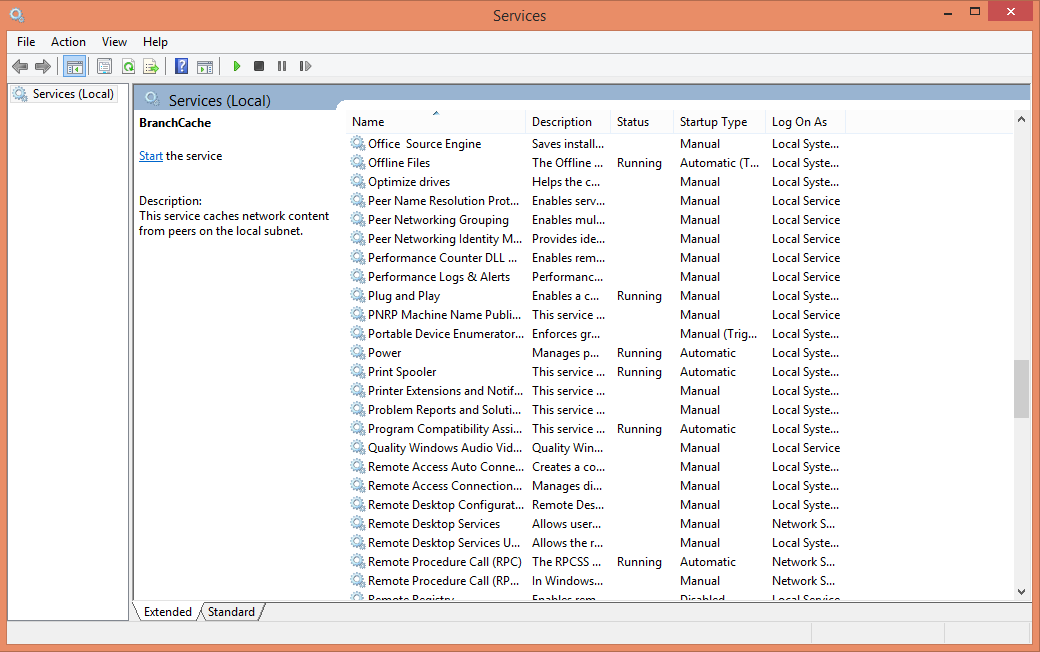
You can see all Windows services and their current states by opening the charm bar, or clicking the Start button, and entering services.msc in the search field. Similar to the program-uninstallation console, the Services panel displays all of the services alphabetically by default. You can also sort the listing by clicking the Description, Status,Startup Type, or Log On As column.
You might not need some Windows services, but proceed with caution lest you remove something your PC is actually using.
Five services in particular are rarely used by most people and could expose your PC to unnecessary risk. If you don’t connect any Bluetooth devices to your PC, you have no reason to keep the Bluetooth Support Service enabled. If you don’t use Remote Desktop, you should disable the three Remote Desktop services. The services listing also includes the Remote Registry service; this item is typically disabled by default, but you should make sure it’s not enabled.
If you want a longer list of potential services to axe, check out this post on the Internet Security Blog. Remember, though, don’t be overzealous about disabling services you’re not sure about, and be prepared to turn a service back on if your PC starts having problems.
To change a service, right-click it and choose Properties. In the middle of the General tab is a field called ‘Startup type’. Change this setting from Automatic or Manual to Disabled. Just below that is a section called ‘Service Status’. Make sure the current status isStopped. If it isn’t, click Stop. Finally, click OK at the bottom to save the changes you’ve made.
Obsolete data
Most people are guilty of hoarding data to some extent—much of it, perhaps, without their knowledge. You might have duplicate copies of music or photos, or Word documents for reports you wrote seven years ago, along with temporary and cached files that might be hogging gigabytes of space on your hard drive.
Hard drives are relatively cheap, and it’s not uncommon for PCs on the market today to come with a terabyte or more of storage, so having lots of data files sitting around may not seem like a big deal. A PC relies on unused storage as an extension of RAM, though, and as your drive runs out of space—or as the available space becomes scattered and cluttered—it affects performance.
Windows has its own utility to neaten up a hard drive whose data has scattered hither and yon and is slowing performance.
Windows offers built-in utilities that can help. Right-click the drive you want to work with in Windows Explorer, and select Properties. On the General tab, you’ll see a Disk Cleanupbutton; click this button to have Windows scan the drive and identify the redundant or unnecessary files it believes you can safely delete. You can check or uncheck the different boxes, and click OK to clean up your drive. Clicking the Clean Up System Filesbutton performs a more comprehensive analysis of Windows system data you can sweep away.
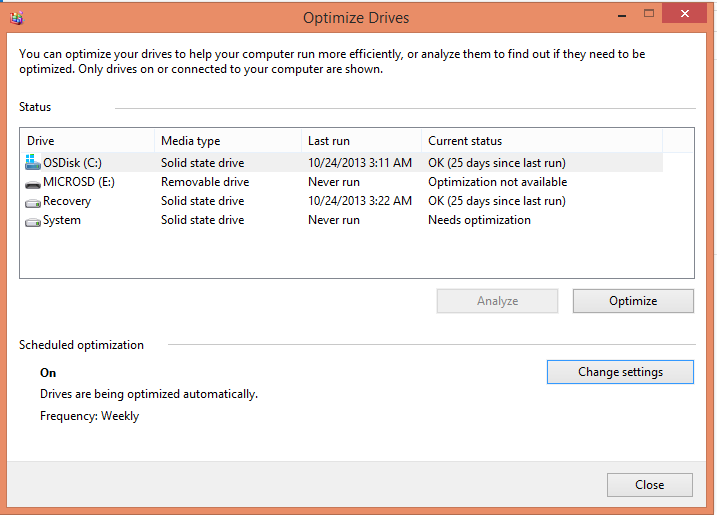
Click the Tools tab of Drive Properties to see an option to defragment and optimize the drive. Over time, the files on your drive become scattered about as Windows reads and writes data to different portions of the drive. Defragmenting the data helps Windows operate more efficiently, and reduces wear and tear on the moving components of traditional drives.
In Windows 8, the button says Optimize. When you click it, the current disk-optimization settings for each of your drives are displayed, along with the current status specifying the last time the drive was optimized. You can click the Change Settings button to choose which drives should be optimized automatically, and configure the frequency of scheduled optimization to Daily, Weekly, or Monthly. I prefer Weekly as a reasonable middle ground.
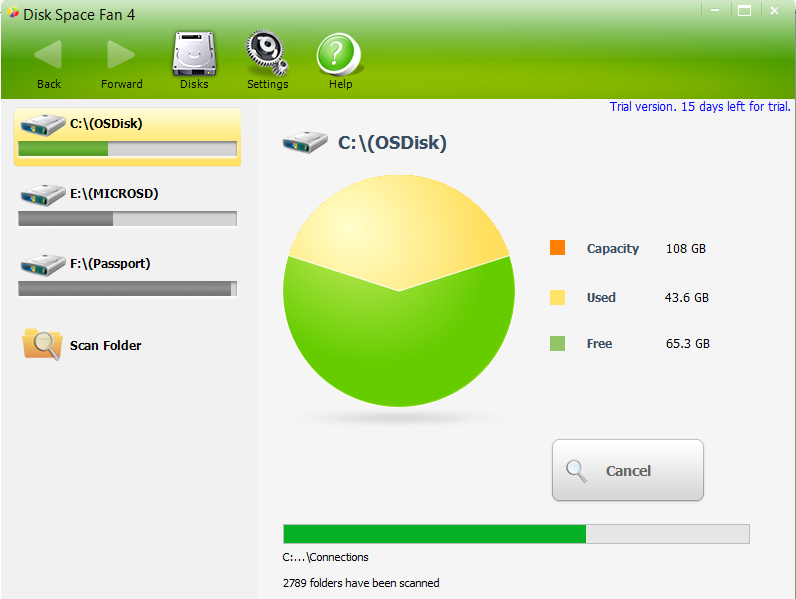
Disk Space Fan helps ferret out additional files that you could delete.
For a more aggressive approach, you can try a third-party tool such as Disk Space Fan. Even after you use the Windows Disk Cleanup tool, Disk Space Fan can find additional files that you probably don’t need on your system. Disk Space Fan also identifies duplicate files and provides a simple way to remove redundant data.
Whether you have 100MB or 3TB of storage capacity, there’s no point in filling it up with applications and data you don’t need, and possibly exposing your system to unnecessary risk of compromise or exploit. Spend a little while to clean up your PC every now and then, and you’ll optimize its performance and keep it safe at the same time.
If you work in an organization, you’ve heard this complaint repeatedly. Leaders and managers say they want change and continuous improvement but their actions do not match their words.
The leaders’ exhortations to employees ring false when their subsequent actions contradict their words. A CEO once asked me, “Why do they do what I do and not what I tell them to do?” Another asked, “Do I really have to change, too?” These are scary questions coming from leaders.
The power of an organization’s leaders in creating the organization’s values, environment, culture and actions is immeasurable. Want to know how to “walk your talk” to enable organization change and improvement?
Want to take the power away from the oft-repeated employee complaint that managers don’t walk their talk? Start here to learn how to walk your talk. Or, use these ideas to help your organization’s leaders and managers walk theirs. It’s the shortest journey to empower change and the work environment they desire.
Tips about How to Walk Your Talk
The most important tip comes first. If you do this first action well, the rest will follow more naturally. If the ideas you are promoting are congruent with yourcore beliefs and values, these actions will come easily, too. So, start with a deep understanding of “why” you want to see the change or improvement and what change or improvement you want to see. Make certain it is congruent with what you deeply believe. Then, understand and follow these guidelines.
Model the behavior you want to see from others. There is nothing more powerful for employees than observing the “big bosses” do the actions or behaviors they are requesting from others. As Mahatma Gandhi said, “Become the change you wish to see in the world." And, it will happen.
If you make a rule or design a process, follow it, until you decide to change it. Why would employees follow the rules if the rule makers don’t?
Act as if you are part of the team, not always the head of it. Dig in and do actual work, too. People will appreciate that you are personally knowledgeable about the effort needed to get the work done. They will trust your leadership because you have undergone their experience.
Help people achieve the goals that are important to them, as well as the goals that are important to you. Make sure there is something for each of you that will result from the effort and work.
Do what you say you're going to do. Don’t make rash promises that you can’t keep. People want to trust you and your leadership.
Build commitment to your organization’s big goal.(You do have a big, overarching goal, don’t you?) Other than to make money, why does your organization exist?
Use every possible communication tool to build commitment and support for the big goal, your organization’s values, and the culture you want to create. This includes what you discuss at meetings, in your corporate blog, on your Intranet, in social media, and so forth.
Hold strategic conversations with people so people are clear about expectations and direction. Gerard Kleisterlee, Philips' president, is holding strategic conversations with as many groups as he can. "In order to build internal confidence, stimulate cross-boundary cooperation, and spark new-product speed to market, Kleisterlee is sponsoring what he calls ‘strategic conversations’: dialogues that center around a focused set of themes that Kleisterlee believes will define Philips' future."
Ask senior managers to police themselves. They must provide feedback to each other when they fail to walk their talk. It is not up to the second level managers and other employees to point out inconsistencies. (Confronting a manager takes courage, facts and a broad understanding of the organization.) Senior managers must be accountable to each other for their own behavior.
In 1513, Machiavelli wrote, “There is nothing more difficult to plan, more doubtful of success, nor more dangerous to manage than the creation of a new system. For the initiator has the enmity of all who would profit by the preservation of the old system and merely lukewarm defenders in those who would gain by the new one.”
Given these thoughts from Machiavelli - true for centuries – provide leadership and sponsorship through walking your talk. Incorporate these tips and behaviors to ensure the success of your organization. Walk your talk.
By Richard Adhikari TechNewsWorld 01/14/14 5:00 AM PT
NoSQL databases are generally better-suited to handling Big Data than RDBMSes are. For example, in an RDBMS, data for a given record is spread across many tables, requiring joins and careful coordination of a transaction across them all, said MongoDB's Kelly Stirman. That means transactions must be very sophisticated and be able to address a variety of failure scenarios.
The Pain of Big Data
Social media contribute 90 percent or so of the data available today, while the use of geographical information systems, including location-based data systems, is growing rapidly.
In 2012, about 2.5 quintillion bytes of data were being produced every day. Meanwhile, the size of data sets was increasing, from a comparatively paltry few terabytes to several petabytes and, now, to several terabytes.
Businesses want to analyze the data because they yield important customer information. Walmart, for instance, is reported to have exhaustive consumer data on more than 145 million Americans that it shares with more than 50 third parties.
Further, companies are increasingly using predictive analytics to increase customer profitability and reduce customer churn, and that again requires managing Big Data.
However, analyzing such large quantities of data requires improvements in queries, the accuracy of responses to those queries and the speed of those responses.
NoSQL Databases Make Simplicity a Virtue
The relatively simple architecture of NoSQL databases is simply better-suited than that of RDBMSes to handling Big Data.
In an RDBMS, data for a given record is spread across many tables, requiring joins and careful coordination of a transaction across them all, Kelly Stirman, director of product marketing at MongoDB, told TechNewsWorld. That means transactions must be very sophisticated and be able to address a variety of failure scenarios.
Performing joins and transactions across tables becomes increasingly difficult as an RDBMS scales.
"The schema flexibility and distributed nature of most NoSQL databases make them complementary in various types of Big Data environments," Nick Heudecker, a research director at Gartner, told TechNewsWorld.
For example, NoSQL databases using document store technologies such as Couchbase let users address the documents through unique keys that represent each document. Many also offer an application programming interface or query language that lets users retrieve documents based on their contents, however, while others allow for retrieval using MapReduce.
Global travel and tourism industry player Amadeus is running a pilot using Couchbase as "a very efficient key-value store," Dietmar Fauser, its vice president of Architecture, Quality & Governance divisions for Research and Development, told TechNewsWorld. "The document store aspects of Couchbase will be used in a second step."
Cutting Costs With Commodity Hardware
Another plus for NoSQL databases is that they are developed to run on clusters of commodity hardware, which is inexpensive to source and replace. That also means they are distributed and have no single point of failure.
"NoSQL is about building the next generation of operational databases that have to deal with a large data set that is semi-structured and needs a flexible data schema; a distributed scale-out architecture that provides elasticity and easy scaling; high performance and low latency for billions of users at Internet scale; and an always-on architecture that allows for upgrades and maintenance of a system on-the-fly with no maintenance downtimes," Rahim Yaseen, the company's senior vice president of engineering, told TechNewsWorld.
For example, Couchbase is a scale-out topology with "a true Shared Nothing cluster architecture" so there is no contention for centralized resources, Yaseen explained. To scale up, users just add nodes to the Couchbase cluster.
Is ACID Necessary?
By being distributed, fault-tolerant and run on clusters of commodity servers, NoSQL databases made a trade-off over ACID -- Atomicity, Consistency, Isolation and Durability -- properties and other issues.
Some NoSQL databases offer ACID while others don't; yet others offer partial ACID support.
Couchbase does not support full ACID because "for modern Internet applications with data and users at Internet scale, and with flexible schema data, it is more important to focus on consistency, durability and atomicity," Yaseen said.
MongoDB "provides strong consistency and guarantees ACID operations at the document level, which tends to be sufficient for most applications," the company's Stirman said.
"With very few exceptions, first-generation NoSQL databases do not support ACID transactions and therefore do not support SQL," Nick Lavezzo, cofounder of FoundationDB, told TechNewsWorld. "The lack of distributed ACID transaction support and, therefore, lack of perfect data consistency has been the biggest barrier holding NoSQL database technologies out of mission-critical tasks at large enterprises."
Some database vendors that do not support ACID transactions "confuse the issue by attempting to redefine ACID to mean some weaker set of guarantees than it has traditionally meant," Lavezzo stated.
Moving Towards Acidity
ACID transactions let FoundationDB support multiple data models on top of a single storage engine architecture, Lavezzo said.
New-generation distributed database technologies such as Google Spanner F1 and FoundationDB both support data models typical of NoSQL and also support true SQL, which requires ACID support, he pointed out.
However, the lack of ACID support will not be easily remedied.
"Having spent four years building FoundationDB -- and it apparently took Google about four years to build Spanner -- we know how hard this problem is," Lavezzo remarked. "Because of this, I don't see any NoSQL technologies adding true ACID transactions any time in the foreseeable future."
Back years ago, the company I worked for needed to change the way it went to market and the internet. I will say it was a great experience from a business prospective and being a part of this historic group. Here is how it developed.
In the late 90's the company realized it had to change how it dealt with customers and how it went to market. It was stuck in the old print model and everything was changing to e-commerce and the internet. The company formed 3 teams (publishing, sales, and editorial) made up of individuals from every part of the business. I was part of the sales group. What did we do:
we evaluated steps in each process right to delivery based on current business practice.
we tore down each step and evaluated based time, cost, and how new technology, connectivity and software would work better and streamline delivery.
we designed a new process based on software, technology, and connectivity to better serve the customer and maximize revenue and profits.
we built powerpoint presentations of our new processes (new company) and presented them to the CEO, COO, and leaders of the 3 key areas.
Changes were made based on their approvals and the company became a leader in these new processes.
This experience was great and we did this while we were doing our daily jobs. Needless to say, the number of man hours we put in were enormous over this 3 month time. What I am going to say may astonish you but there were two comments about me (HR) from the leader of our sales team Sheila Rice (current executive at Northstar Travel Media), " you don't think like an HR person you think like a business person" and "the value you brought to this team was outstanding because you viewed the end result like a customer would". The second comment was from Greg Flores (current EVP & CHRO at TJX Corporation), " Bill you can make something from nothing that has value".
Now, I'm not blowing my horn but this is what all HR practicioners should provide to their businesses.
The new year will bring its inevitable ups and downs, but you can ensure a happy start by saying thank you to the people who make such a difference to you and your company.
As we jump into another year, it's important to set aside time to consider the people who make a difference in our lives and in our businesses, to be grateful for the roles they play, and to let them know how much we value them. It only takes a minute (and often less) to express our gratitude, but the impact can be very powerful.
So, to kick the year off on a happy note (maybe even a handwritten one) make sure you acknowledge:
Your People
Always remember that it's your employees who either make or break your business, and your business can only be as good as they are. Be grateful to your people, and regularly take time out of your busy day to thank them for their good work. Follow the example of the CEO of Paragon Steakhouse, who keeps a stack of notecards on his desk to write personal notes of thanks to employees at the end of each workday.
Your Customers
Without customers, of course, you don't have a business. Sure, they can sometimes be demanding, unreasonable, and a pain to deal with, but if you want your business to grow and thrive, you need them (perhaps more than they need you). Be grateful for your customers, and be sure they know you care about them. The fresh-baked chocolate chip cookies given out by DoubleTree hotels to guests upon check-in (60,000 a day!) is just one way the company shows it cares about its customers.
Your Vendors
It's easy to forget to be grateful to the vendors and other business partners that provide you with the materials, supplies, and services that your business needs to operate. But they are a vital and long-term part of your ability to serve your own customers, and you should be grateful to have them on your team. One South Carolina furniture retailer holds an annual Vendor Appreciation Day, where representatives of the company’s more than 30 vendors are offered breakfast, lunch, and cocktails, hourly door prizes, and jars of company owner Dana McQueen’s popular homemade pepper jelly.
Your Colleagues
Your colleagues are the people you turn to when you’ve got questions about how things work, how best to navigate a particular company policy or procedure, how to make a connection with a member of their business or other networks, and much more. Ten team members at Burlington Massachusetts-based PR firm Davies Murphy Group were invited to attend a business meeting by a colleague, which turned out to be a complementary lunch at a local restaurant.
Your Mentors
Many of us have mentors at work: the people who helped show us the ropes as we became acclimated to a new organization or as we worked our way up the ladder. Thank your mentors with a personal thank-you note, or consider posting a tribute to your mentors on the Harvard Mentoring Project website during January, which just happens to be National Mentoring Month.
Your Community
Businesses naturally become an integral part of the communities in which they do business--they hire its people, contribute to the tax base, become points of local pride, and much more. Show gratitude to your community by regularly giving back in any way you can. Instead of writing checks, Angela Massaro-Fain, president of Grapevine Communications in Sarasota, Florida, offers free strategic marketing, PR, and design services to local nonprofits.
Your Friends and Family
They are the ultimate bottom line: the family and friends who love and sustain us through good times and bad. It’s for them that we work so hard to succeed. Show your gratitude every day by being there for them, taking time to listen to them, giving them a warm hug, and by telling them you love and appreciate them. Remember to spend quality time with family and friends. As the old saying goes, no one on their deathbed ever wished they had spent more time at work.
If you agree, send me your comments at wgstevens2@gmail.com .