There is a great article in Fortune magazine this month (February 3, 2014, go to Fortune.com) about hiring top talent. The most interesting thing about the article is not the hiring of top talent which has been a mantra for HR for many years but how they are hired.
The article indicates that most HR executives have been blindsided by people looking for jobs using their mobile devices and not the traditional new wave of using the website. 82% of the 1,000 job seekers surveyed by Glassdoor.com said they expected to use their mobile devices during idle time to look for jobs.
HR get readjusted and make sure you are not on the long end of this trend. Candidates want things on the palm of their hand, not a laptop or desktop anymore.
Monday, January 27, 2014


Sunday, January 19, 2014
Declutter Your PC For Better Security and More Storage
A cluttered hard drive can be disorderly and slow, but it can also be a security hazard. This is especially true of any software on your PC that you rarely, if ever, use. Perhaps you installed a free demo, or you completed a game and you’ll never touch it again.
Chances are good that the software you’re not actively using isn’t being patched and kept up-to-date, which means it may leave your PC vulnerable to exploits.
Just as you regularly remove expired jars of mayonnaise and uneaten leftovers from your refrigerator (right?), any time is a good time to rid your PC of useless and unwanted programs. It never hurts to clear out old data files you’ll never need again, too. Here are some tips to help you purge all that dreck from your PC.
Unused applications
In Windows, go into the Control Panel, look under Programs, and click Uninstall a program. A window will display a list of all the applications installed on the PC. By default the list is organized alphabetically, but you can click the Publisher, Installed On, Size, orVersion column heading to sort the list accordingly.
If your goal is to free up space on your PC, you should start by sorting the list of applications by size. You’ll be able to quickly identify which software is taking up the most space on your hard drive, and remove the applications you don’t need or use.

The built-in Windows tool isn’t always the best, though, and sometimes the uninstallation process leaves trace elements of applications behind. For a more thorough housecleaning, look to a utility such as Revo Uninstaller.
Revo can scan your system for remnants left over from the standard uninstall—orphaned Windows services, file associations, shell extensions, and other components—and forcibly remove them. A free version of the software is available, but you need the $40 Revo Uninstaller Pro to get the greatest benefits.

Unnecessary services
Windows services are also programs, but not the kind that you actively use. They run in the background, mostly starting and stopping automatically. They perform many core system functions and assist software applications in interacting with the Windows operating system in various ways.
Identifying what each service is, or what it does, and whether it’s really necessary can be both confusing and challenging. Removing a service that your system actually needs can have negative consequences on your PC and the applications you use, so you should tread with caution.
You can see all Windows services and their current states by opening the charm bar, or clicking the Start button, and entering
services.msc in the search field. Similar to the program-uninstallation console, the Services panel displays all of the services alphabetically by default. You can also sort the listing by clicking the Description, Status,Startup Type, or Log On As column.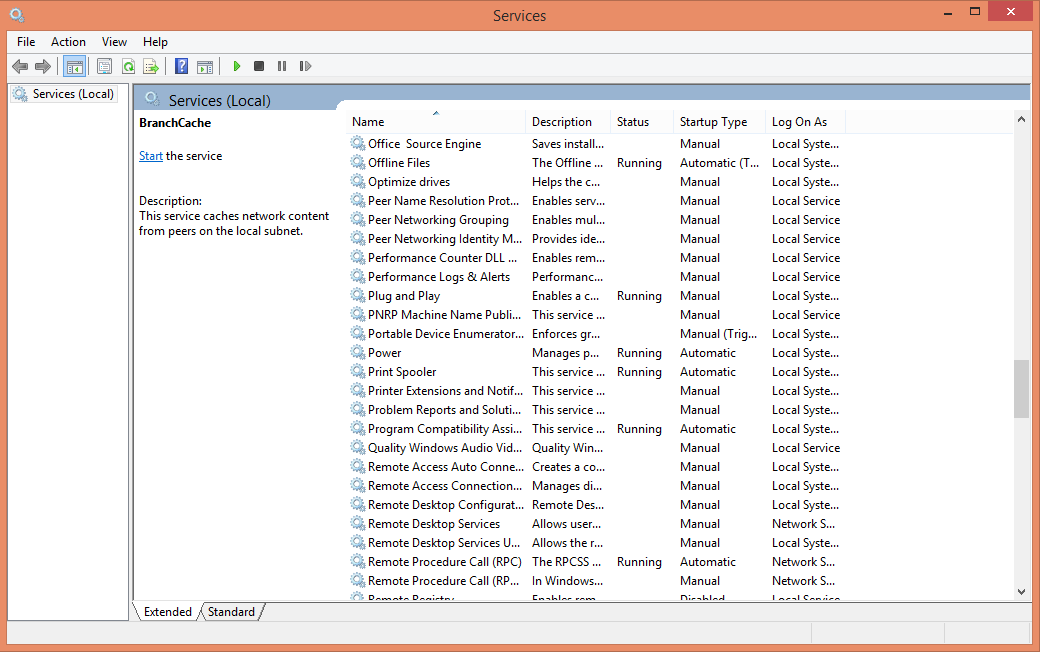
Five services in particular are rarely used by most people and could expose your PC to unnecessary risk. If you don’t connect any Bluetooth devices to your PC, you have no reason to keep the Bluetooth Support Service enabled. If you don’t use Remote Desktop, you should disable the three Remote Desktop services. The services listing also includes the Remote Registry service; this item is typically disabled by default, but you should make sure it’s not enabled.
If you want a longer list of potential services to axe, check out this post on the Internet Security Blog. Remember, though, don’t be overzealous about disabling services you’re not sure about, and be prepared to turn a service back on if your PC starts having problems.
To change a service, right-click it and choose Properties. In the middle of the General tab is a field called ‘Startup type’. Change this setting from Automatic or Manual to Disabled. Just below that is a section called ‘Service Status’. Make sure the current status isStopped. If it isn’t, click Stop. Finally, click OK at the bottom to save the changes you’ve made.
Obsolete data
Most people are guilty of hoarding data to some extent—much of it, perhaps, without their knowledge. You might have duplicate copies of music or photos, or Word documents for reports you wrote seven years ago, along with temporary and cached files that might be hogging gigabytes of space on your hard drive.
Hard drives are relatively cheap, and it’s not uncommon for PCs on the market today to come with a terabyte or more of storage, so having lots of data files sitting around may not seem like a big deal. A PC relies on unused storage as an extension of RAM, though, and as your drive runs out of space—or as the available space becomes scattered and cluttered—it affects performance.
Windows offers built-in utilities that can help. Right-click the drive you want to work with in Windows Explorer, and select Properties. On the General tab, you’ll see a Disk Cleanupbutton; click this button to have Windows scan the drive and identify the redundant or unnecessary files it believes you can safely delete. You can check or uncheck the different boxes, and click OK to clean up your drive. Clicking the Clean Up System Filesbutton performs a more comprehensive analysis of Windows system data you can sweep away.
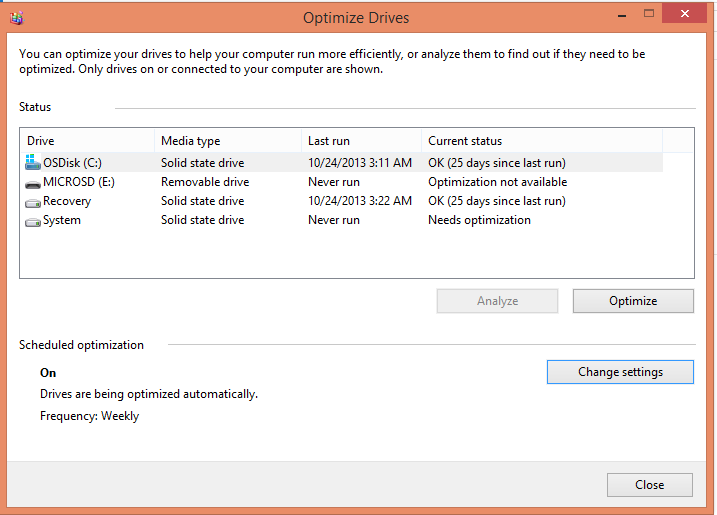
Click the Tools tab of Drive Properties to see an option to defragment and optimize the drive. Over time, the files on your drive become scattered about as Windows reads and writes data to different portions of the drive. Defragmenting the data helps Windows operate more efficiently, and reduces wear and tear on the moving components of traditional drives.
In Windows 8, the button says Optimize. When you click it, the current disk-optimization settings for each of your drives are displayed, along with the current status specifying the last time the drive was optimized. You can click the Change Settings button to choose which drives should be optimized automatically, and configure the frequency of scheduled optimization to Daily, Weekly, or Monthly. I prefer Weekly as a reasonable middle ground.
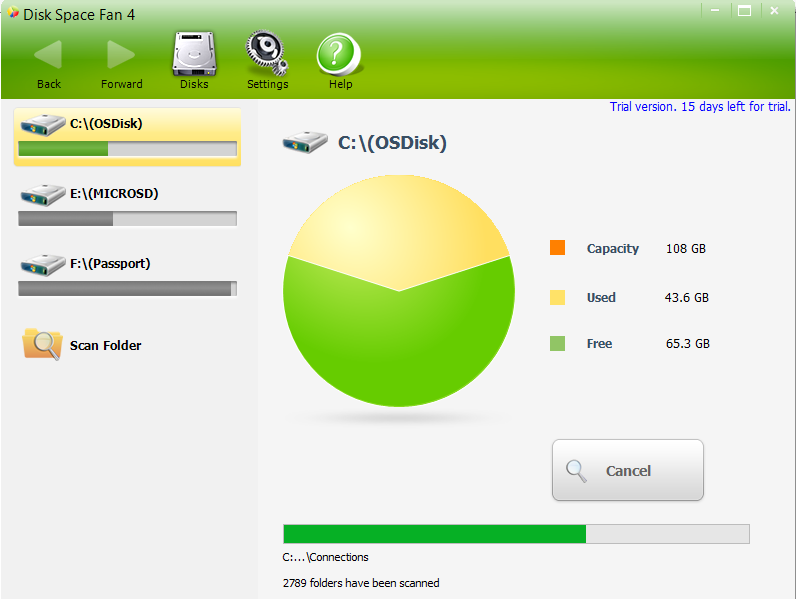
For a more aggressive approach, you can try a third-party tool such as Disk Space Fan. Even after you use the Windows Disk Cleanup tool, Disk Space Fan can find additional files that you probably don’t need on your system. Disk Space Fan also identifies duplicate files and provides a simple way to remove redundant data.
Whether you have 100MB or 3TB of storage capacity, there’s no point in filling it up with applications and data you don’t need, and possibly exposing your system to unnecessary risk of compromise or exploit. Spend a little while to clean up your PC every now and then, and you’ll optimize its performance and keep it safe at the same time.
Saturday, January 18, 2014
How to Walk Your Talk - Leadership and Sponsorship in Action
If you work in an organization, you’ve heard this complaint repeatedly. Leaders and managers say they want change and continuous improvement but their actions do not match their words.
The leaders’ exhortations to employees ring false when their subsequent actions contradict their words. A CEO once asked me, “Why do they do what I do and not what I tell them to do?” Another asked, “Do I really have to change, too?” These are scary questions coming from leaders.
The power of an organization’s leaders in creating the organization’s values, environment, culture and actions is immeasurable. Want to know how to “walk your talk” to enable organization change and improvement?
Want to take the power away from the oft-repeated employee complaint that managers don’t walk their talk? Start here to learn how to walk your talk. Or, use these ideas to help your organization’s leaders and managers walk theirs. It’s the shortest journey to empower change and the work environment they desire.
Tips about How to Walk Your Talk
The most important tip comes first. If you do this first action well, the rest will follow more naturally. If the ideas you are promoting are congruent with yourcore beliefs and values, these actions will come easily, too. So, start with a deep understanding of “why” you want to see the change or improvement and what change or improvement you want to see. Make certain it is congruent with what you deeply believe. Then, understand and follow these guidelines.
- Model the behavior you want to see from others. There is nothing more powerful for employees than observing the “big bosses” do the actions or behaviors they are requesting from others. As Mahatma Gandhi said, “Become the change you wish to see in the world." And, it will happen.
- If you make a rule or design a process, follow it, until you decide to change it. Why would employees follow the rules if the rule makers don’t?
- Act as if you are part of the team, not always the head of it. Dig in and do actual work, too. People will appreciate that you are personally knowledgeable about the effort needed to get the work done. They will trust your leadership because you have undergone their experience.
- Help people achieve the goals that are important to them, as well as the goals that are important to you. Make sure there is something for each of you that will result from the effort and work.
- Do what you say you're going to do. Don’t make rash promises that you can’t keep. People want to trust you and your leadership.
- Build commitment to your organization’s big goal.(You do have a big, overarching goal, don’t you?) Other than to make money, why does your organization exist?
- Use every possible communication tool to build commitment and support for the big goal, your organization’s values, and the culture you want to create. This includes what you discuss at meetings, in your corporate blog, on your Intranet, in social media, and so forth.
- Hold strategic conversations with people so people are clear about expectations and direction. Gerard Kleisterlee, Philips' president, is holding strategic conversations with as many groups as he can. "In order to build internal confidence, stimulate cross-boundary cooperation, and spark new-product speed to market, Kleisterlee is sponsoring what he calls ‘strategic conversations’: dialogues that center around a focused set of themes that Kleisterlee believes will define Philips' future."
- Ask senior managers to police themselves. They must provide feedback to each other when they fail to walk their talk. It is not up to the second level managers and other employees to point out inconsistencies. (Confronting a manager takes courage, facts and a broad understanding of the organization.) Senior managers must be accountable to each other for their own behavior.
In 1513, Machiavelli wrote, “There is nothing more difficult to plan, more doubtful of success, nor more dangerous to manage than the creation of a new system. For the initiator has the enmity of all who would profit by the preservation of the old system and merely lukewarm defenders in those who would gain by the new one.”
Given these thoughts from Machiavelli - true for centuries – provide leadership and sponsorship through walking your talk. Incorporate these tips and behaviors to ensure the success of your organization. Walk your talk.
Thursday, January 16, 2014
NoSQL, Part 2: Grappling With Big Data
NoSQL databases are generally better-suited to handling Big Data than RDBMSes are. For example, in an RDBMS, data for a given record is spread across many tables, requiring joins and careful coordination of a transaction across them all, said MongoDB's Kelly Stirman. That means transactions must be very sophisticated and be able to address a variety of failure scenarios.
The Pain of Big Data
Social media contribute 90 percent or so of the data available today, while the use of geographical information systems, including location-based data systems, is growing rapidly.
In 2012, about 2.5 quintillion bytes of data were being produced every day. Meanwhile, the size of data sets was increasing, from a comparatively paltry few terabytes to several petabytes and, now, to several terabytes.
Businesses want to analyze the data because they yield important customer information. Walmart, for instance, is reported to have exhaustive consumer data on more than 145 million Americans that it shares with more than 50 third parties.
Further, companies are increasingly using predictive analytics to increase customer profitability and reduce customer churn, and that again requires managing Big Data.
However, analyzing such large quantities of data requires improvements in queries, the accuracy of responses to those queries and the speed of those responses.
NoSQL Databases Make Simplicity a Virtue
The relatively simple architecture of NoSQL databases is simply better-suited than that of RDBMSes to handling Big Data.
In an RDBMS, data for a given record is spread across many tables, requiring joins and careful coordination of a transaction across them all, Kelly Stirman, director of product marketing at MongoDB, told TechNewsWorld. That means transactions must be very sophisticated and be able to address a variety of failure scenarios.
Performing joins and transactions across tables becomes increasingly difficult as an RDBMS scales.
"The schema flexibility and distributed nature of most NoSQL databases make them complementary in various types of Big Data environments," Nick Heudecker, a research director at Gartner, told TechNewsWorld.
For example, NoSQL databases using document store technologies such as Couchbase let users address the documents through unique keys that represent each document. Many also offer an application programming interface or query language that lets users retrieve documents based on their contents, however, while others allow for retrieval using MapReduce.
Global travel and tourism industry player Amadeus is running a pilot using Couchbase as "a very efficient key-value store," Dietmar Fauser, its vice president of Architecture, Quality & Governance divisions for Research and Development, told TechNewsWorld. "The document store aspects of Couchbase will be used in a second step."
Cutting Costs With Commodity Hardware
Another plus for NoSQL databases is that they are developed to run on clusters of commodity hardware, which is inexpensive to source and replace. That also means they are distributed and have no single point of failure.
"NoSQL is about building the next generation of operational databases that have to deal with a large data set that is semi-structured and needs a flexible data schema; a distributed scale-out architecture that provides elasticity and easy scaling; high performance and low latency for billions of users at Internet scale; and an always-on architecture that allows for upgrades and maintenance of a system on-the-fly with no maintenance downtimes," Rahim Yaseen, the company's senior vice president of engineering, told TechNewsWorld.
For example, Couchbase is a scale-out topology with "a true Shared Nothing cluster architecture" so there is no contention for centralized resources, Yaseen explained. To scale up, users just add nodes to the Couchbase cluster.
Is ACID Necessary?
By being distributed, fault-tolerant and run on clusters of commodity servers, NoSQL databases made a trade-off over ACID -- Atomicity, Consistency, Isolation and Durability -- properties and other issues.
Some NoSQL databases offer ACID while others don't; yet others offer partial ACID support.
Couchbase does not support full ACID because "for modern Internet applications with data and users at Internet scale, and with flexible schema data, it is more important to focus on consistency, durability and atomicity," Yaseen said.
MongoDB "provides strong consistency and guarantees ACID operations at the document level, which tends to be sufficient for most applications," the company's Stirman said.
"With very few exceptions, first-generation NoSQL databases do not support ACID transactions and therefore do not support SQL," Nick Lavezzo, cofounder of FoundationDB, told TechNewsWorld. "The lack of distributed ACID transaction support and, therefore, lack of perfect data consistency has been the biggest barrier holding NoSQL database technologies out of mission-critical tasks at large enterprises."
Some database vendors that do not support ACID transactions "confuse the issue by attempting to redefine ACID to mean some weaker set of guarantees than it has traditionally meant," Lavezzo stated.
Moving Towards Acidity
ACID transactions let FoundationDB support multiple data models on top of a single storage engine architecture, Lavezzo said.
New-generation distributed database technologies such as Google Spanner F1 and FoundationDB both support data models typical of NoSQL and also support true SQL, which requires ACID support, he pointed out.
However, the lack of ACID support will not be easily remedied.
"Having spent four years building FoundationDB -- and it apparently took Google about four years to build Spanner -- we know how hard this problem is," Lavezzo remarked. "Because of this, I don't see any NoSQL technologies adding true ACID transactions any time in the foreseeable future."
Thursday, January 9, 2014
Changing the Company - A Great Experience
Back years ago, the company I worked for needed to change the way it went to market and the internet. I will say it was a great experience from a business prospective and being a part of this historic group. Here is how it developed.
In the late 90's the company realized it had to change how it dealt with customers and how it went to market. It was stuck in the old print model and everything was changing to e-commerce and the internet. The company formed 3 teams (publishing, sales, and editorial) made up of individuals from every part of the business. I was part of the sales group. What did we do:
- we evaluated steps in each process right to delivery based on current business practice.
- we tore down each step and evaluated based time, cost, and how new technology, connectivity and software would work better and streamline delivery.
- we designed a new process based on software, technology, and connectivity to better serve the customer and maximize revenue and profits.
- we built powerpoint presentations of our new processes (new company) and presented them to the CEO, COO, and leaders of the 3 key areas.
- Changes were made based on their approvals and the company became a leader in these new processes.
Now, I'm not blowing my horn but this is what all HR practicioners should provide to their businesses.
Wednesday, January 8, 2014
New-Country Start-Up HR Toolkit: What You Need to Know When Launching Employment Operations In Some New Overseas Jurisdiction
I saw this article from White & Case and felt all of you should read it carefully if your company is planning on launching an overseas location. You as the knowledgeable HR person should be on your toes with O/S knowledge in specific country laws and practices.
Having managed O/S location, people, and product lines this is a must in today's economic environment where there really are no business borders.
So read this article using this link: http://www.cupahr.org/knowledgecenter/files/intl-symp-2012/04090_Dowling_Byline_V4.pdf
If you are cutting back on staff, production, or closing an O/S facility you should read this article as well from White & Case: http://eb.whitecase.com/files/News/ffaa14fa-4310-4341-bb05-fac07825a21e/Presentation/NewsAttachment/46c44b00-385a-460d-9609-1c553764abae/International_HR_Economic_Downturn_Toolkit.pdf
Monday, January 6, 2014
Sunday, January 5, 2014
HR Budgets
Well, the new year is here and your budget should be in place for 2014. What most new P&L responsible people do is spend immediately on things that have been building up over the past quarter or when your budget was slashed.
Word to the wise, be mindful of how you utilize your budget. Rethink those things you put into it and make sure that they will have the most impact on your business. To be a key business partner what will benefit those in your perview most.
Another thing, I want to take this a step further. Again, I have always advocated that the CFO is one of your best partners in business, besides the CEO relationship and is probably the next most important. Why you ask, well just think about it for a second. Who manages the finances in the organization and who do you go to when you want to add extra dollars into a project, manpower, program or budget line? The CFO.
Over the past 20 years in business I have made it a point to partner very closely with my CFO. With that relationship we worked together on strategy with the CEO, innovation and the other very important parts of the business. HR & Finance was in all the meetings together with business leaders, driving deeper into the budgeting, strategy, business change, customer, supply chain, and human capital issues. It was a great relationship that was built on trust, understanding, a need for change, and a keen sense of business economics.
The only way for HR to flourish within an organization is with a close relationship with your finance department and your CFO. Do you have that type of relationship or is it an arms length, adversarial relationship, I hope not.
Happy 2014, and spend your budget wisely and manage your P&L like a pro.
Tuesday, December 31, 2013

Monday, December 30, 2013
New Years Resolution for Human Resources
Every year people make resolutions for the new year but how many really follow through with them? For those of you in human resources I would make the following resolutions and stick with them if you want to continue to sit at the table or even be invited.
- make a concerted effort to ensure you are managing talent;
- be totally involved in the business from the ground floor up;
- hire with passion and intensity;
- interview candidates with deep questions, touch their EQ;
- visit creative communities and see what may fit into your business model;
- use employees as resources not just as workers;
- advertise creatively using all social networks as a basis;
- counsel the CEO, be his/er right hand on everything;
- celebrate failure as the basis for new innovation, there is no strike out in innovation and creativity;
- lead don't follow.
I hope that these new years resolutions resonate & will help you be the HR exec or CHRO you want to be and should be to be successful. Feel free to add to the list by emailing me or commenting on this post.
Saturday, December 28, 2013
Employee Down Time Review for 2014
If you have been keeping up with the news about overworked workers then you should consider reviewing your paid time off. This year surveys have indicated that employees are over worked, stressed out and have had trouble keeping up with all the communications from workers, managers, customers and the like. So the question is what are you doing about it?
One company has turned off emails on Fridays and turned it back on on Monday morning. Drastic but it tells the employee that the company cares about his/er quality of life. Another company is only communicating with its employees during work hours and nothing after the close of business. Drastic again considering if there is a disruption in business continuity.
Well, what are you doing for 2014 that is the big question. If you care about your human capital and their well being you may want to review your time off policies and make accommodations for employees so they have more off hour down time.
At the end o the day this is not a cost issue but a return on investment issue!!!!
Tuesday, December 24, 2013

Thursday, December 19, 2013
Career Creativity
Companies on this year's Most Admired for HR list are encouraging employees to take more control of their professional development and consider less-traditional, better-fitting career moves.
By Mark McGraw
Monday, December 9, 2013

Like many others, Robb Webb's career path hasn't followed a perfectly straight line.
"I stumbled into the HR field when looking for a job while I was still in college," he says. "When I registered at a Canadian federal-government student-jobs center to find work, they ended up hiring me to work at one of the centers, finding jobs for others."
Webb, who has served as the chief human resource officer at Chicago-based Hyatt Hotels Corp. for the past six-plus years, began his post-college career working on a United Way campaign. His campaign chairman was a Westinghouse Electric Corp. executive, who subsequently hired Webb into the manufacturing company's HR department. Webb has also spent nearly 20 years in the financial-services sector. It was while he was leading Citigroup's international HR function that the company acquired Avco Financial Services in Australia, in hopes of expanding its presence in that market, he says.
"After one year, the integration had not progressed, so the business-unit president asked me to move to Australia to manage the integration," says Webb. "And this was after he had asked me to manage a project to open a business in Hong Kong. He told me he wasn't going to let my title limit me!"
This diverse experience ultimately helped Webb transition into his role as CHRO at Hyatt. He sees parallels between his career trajectory and that of countless co-workers at Hyatt Hotels, an organization that embraces a career-lattice concept offering employees multiple paths upward. Workers help chart their own courses -- getting experience in and collaborating with different disciplines, making lateral moves that uncover new interests and talents, revealing strengths and weaknesses, and gaining more depth and breadth of experience.
Employees seeking these types of opportunities would do well to see the organizations on the 2013 Most Admired for HR list, where Hyatt Hotels finds itself ranked No. 23 overall. (See chart.)
Since 2005, Human Resource Executive® has partnered with Hay Group to compile the "Most Admired for HR" list, culled from Fortune's annual "Most Admired Companies." (See sidebar for methodology.)
Among this year's crop, "I would say I see more organizations trying to define career paths specifically," says Mark Royal, senior principal at Hay Group Insight, the survey research division of the Philadelphia-based consultancy.
With today's employees desiring more responsibility in managing their own careers, "organizations are increasingly [creating] and communicating specific definitions of what career development means in the organization," says Royal, "rather than letting development be defined uniquely in the minds of individual employees."
Leading employers, for example, "are clarifying where employees should expect career development to happen -- in their day-to-day roles versus formal development initiatives -- as well as the roles and responsibilities of employees, managers and the organization in career-development processes," he says.
That said, recent research indicates many employers haven't yet warmed to this concept.
Hay Group employee-opinion norms -- determined from data collected in a series of employee surveys -- reveal that only 57 percent of employees hold favorable views of their opportunities for learning and development in their organizations, and just 44 percent rate their opportunities for advancement highly.
A recent survey by Woodcliff Lake, N.J.-based Lee Hecht Harrison also finds employees lack career-planning and development support. In a poll of 379 U.S.-based workers, just 6 percent said their employers "nearly always" use career planning and development to prepare employees for roles. Only 10 percent said their companies do so "frequently," and 19 percent reported their employers "sometimes" use career planning and development to prepare employees.
Perhaps these statistics also help underscore part of what makes Most Admired companies so admired. Whether driven by a still-shaky economy, scores of baby boomers delaying retirement and affecting Gen Xers' and millenials' advancement opportunities, or simply a desire to flatten out their organizations, many of the companies comprising this year's Most Admired for HR list excel at redefining career arcs -- taking an open-minded approach to career development and encouraging employees to do the same. HRE spoke with HR leaders at a few of those companies, to get a better look at some of the programs and practices that helped earn them this honor.
Personalizing Career Paths
In the past, top-performing companies excelled at professional development "because they could offer a fairly straightforward career-development track," says John Bremen, managing director and leader of Towers Watson's talent and rewards segment in the Americas.
Not anymore, he says.
Towers Watson has "had experience with many" of the organizations on HRE's 2013 list, says Bremen. "And when I look at these companies, I'm trying to think of one that doesn't take [a customized] approach to developing their people. And I can't do it. Tailored career development is a consistent practice among them."
At Oakbrook, Ill.-based McDonald's Corp. -- a Most Admired for HR perennial that ranks No. 25 this year -- high-potential employees are strongly encouraged to develop themselves by taking stretch assignments and working in various functions, says Richard Floersch, executive vice president and chief human resource officer.
With 1.8 million employees and operations in 119 countries, the organization offers plenty of room for movement -- throughout varied geographic areas as well as job functions. Yet, while most employees are eager to receive cross-training and acquire diverse experience and skills, it may be tempting for some to view a lateral move as a step in the wrong direction, he says.
To conquer the latter, "we've taken away some of the negative stigma around lateral moves, by treating them almost as promotions," says Floersch.
For example, "if we believe someone's got strong potential, and they're moving into a new function, we treat their offer package the same way we would [treat] a promotion," including salary, he says.
"It's about making sure people don't feel it's a side step, but feel it's an investment for the future," says Floersch. "The experience the employee gets [in a new market and/or job capacity] will, over the course of the next 10 to 15 years, likely differentiate him or her from peers who haven't gotten that experience."
McDonald's also boasts a "fast track" operations program designed to help high-potential employees stretch their skills while gaining experience in all facets of the company, says Floersch. Typically, these are employees from corporate staff functions "who aspire [to] and are judged to have strong leadership capabilities, results orientation and influencing skills," he says. Candidates "are evaluated by a panel of line leaders and HR against those dimensions. If they pass, then they start out working shifts in the restaurants and progress in an accelerated fashion.
"If you want to become a line leader and you're in the staff area, you have to start as a shift manager and work your way up," he says. "That could take 18 months or so. So that's a sizable investment. But if that's what an employee wants, then we help them get there." Employees selected for the fast-track program are assigned career coaches who help them map out career-development plans, says Floersch.
At Hyatt Hotels, employees aspiring to get on a similar track historically required very specific experience, says Webb. He and his HR team have helped change that.
"For example, it used to be that there were two paths to becoming a general manager -- through the food and beverage division or through the rooms division.
"When I got here, I had come from banking," says Webb. "I was told you come up through one of those divisions to reach management. I said, 'What about HR? Wouldn't some of the fundamental traits of an HR person fit well in a GM position?' "
A typical response, he says, was that HR -- along with other staff functions, for that matter -- weren't "typically where general managers came from. So there was this notion that, if something's worked for a long time, then why [should we] change it?"
Webb helped launch Hyatt's career-lattice program to assist employees interested in getting on the general-manager career track, and promote other opportunities throughout different divisions.
"The concept is not new," he says. "We simply adapted it from how other [companies] have applied the mind-set."
Webb himself seeks out employees from different divisions to apply for open positions. He cites an HR generalist he and the HR team recently recruited from Hyatt's IT department as an example.
"His technical skills and general interests and inclinations suggested he would meet a need within the HR function at our corporate office," says Webb. "He has been helpful in some of our [technological] communications, and I hope we are helping him develop expertise in the HR space."
Finding a Cultural Fit
The Hyatt Leadership Forum is yet another Hyatt initiative designed to help future leaders advance "beyond a linear career path," says Webb. Hyatt has offered the Leadership Forum for the past three years in partnership with nearby Northwestern University, which co-created the forum and helps modify it based on participant and leadership feedback.
Each year, Hyatt handpicks a group of about 25 high-potential employees -- ranging from general managers in the Middle East all the way to HR and communications directors from right in Chicago -- to take part in the 10-day program. In addition to performing community service throughout the city, participants take a bus trip to Hyatt Chairman and CEO Nicholas Pritzker's farm on the outskirts of Chicago, where they enjoy lunch, discuss the company's history and listen to Pritzker share his vision of Hyatt's future.
While the Leadership Forum "remains in its early days," says Webb, he and the HR team have begun to seek input from participants. "We're trying a number of things to measure each cohort, including tracking engagement results through an annual survey. Anecdotal feedback is also important, and we have participants self-reporting as to the experience," he says, noting an employee who recently told him taking part in the Forum " 'will change the way I lead and look at my role.' "
In addition to leadership development, a primary goal of initiatives such as the Hyatt Leadership Forum is to instill a sense of responsibility for maintaining the organization's unique culture, which espouses "thinking in terms of advancement rather than promotion," says Webb. "Strict swim lanes that define career paths can be limiting, and may not always communicate opportunities in the future."
This type of open mind-set is ingrained in the culture at Fortune's Most Admired and HRE's Most Admired for HR companies, many of which use the hiring process to gauge an employee's willingness to tackle diverse roles throughout the organization, says Mel Stark, vice president and regional reward practice leader at Hay Group. In fact, 73 percent of the organizations on Fortune's list test job applicants for cultural fit as part of the recruitment process, according to Hay Group figures.
"There are operational attributes that fit with a company's culture," says Stark. "The better companies look and test to make sure there's a good fit between the employee and his or her work environment."
Count Deere & Co. (No. 16 on the HR-specific list) among them, says Marc Howze, vice president of global human resources at the Moline, Ill.-based manufacturer of agricultural machinery.
Deere's HR team conveys the organization's four key cultural values -- integrity, quality, commitment and innovation -- in its recruiting materials and reinforces the message to employees once they join the company, he says.
"Deere's recruiting and staffing processes are rigorous. Clearly, we seek to have technically competent people working throughout the company. Additionally, we use the process to ask questions of our candidates," says Howze, such as where they feel they thrive as an employee and what accomplishments give them the most pride, for instance.
"By paying close attention to how these questions are answered, we can assess whether individuals will work well in the John Deere culture."
In terms of career development, the company is looking for those who crave disparate work experiences in terms of locale as well as job description, says Howze.
"We offer challenging assignments around the world, with significant responsibility, and we are known for our leadership-development programs," he says.
"We have continued to grow our employment brand in these regions, not simply as a great company to work for, but also as an organization where an individual can achieve [his or her] development goals and career objectives."
At McDonald's, Floersch has his own way of evaluating how much a prospective employee values the flexibility that's such a part of the company's culture. All McDonald's employees are required to spend at least two weeks working at one of the organization's franchises -- manning the drive-thru, tending to the grill, working the cash register and so on.
"When I'm interviewing someone, I ask him or her about working in one of our restaurants. And if they start to look at me funny, then the interview is essentially over," says Floersch. "The only reason we're here is because of the incredible work being done in our restaurants. If [an applicant] doesn't get some sense of why we're here, and how challenging those jobs are, then [he or she] has lost an opportunity to fit in with our culture."
Copyright 2013© LRP Publications
Monday, December 16, 2013
Best Business Smartphones: 10 Top Handsets for Work
UPDATED A round-up of the best smartphones on the market for business users
Once upon a time there was only one firm on the lips of any business' IT team when it came to company phones – BlackBerry (formerly known as Research In Motion or RIM).
BlackBerry is still a big player in the enterprise market but the rest of the pack is hot on its heels, with the likes of Apple, Samsung, Nokia and HTC all eager to get a piece of the business pie.
In no particular order, here are the top 10 smartphones for business use and business users:
BlackBerry Z30
We're kicking off our top 10 with the latest handset from the firm once synonymous with business handsets – the BlackBerry Z30.
BlackBerry has always been a firm favourite in the business arena, but recently people have begun switching en masse to Apple and Android offerings.
The Z30 builds on the BlackBerry Z10 which was used to launch the firm'sBlackBerry 10 operating system, aimed at winning back the business market with an excellent messaging hub.

Offering up a larger, 5-inch fully touch display the Z30 is a more convenient size (compared to the Z10) for many, allowing you to get more information on screen at once. The big advantage with the BlackBerry Z30 is its excellent support for business users.
IT departments can take control of the handset using BlackBerry Enterprise Service 10 (BES 10), with security provided by BlackBerry itself ensuring all your emails and messages are fully encrypted.
The Z30 has a feature known as BlackBerry Balance which allows you to flip quickly between work and personal profiles on the handsets, allowing you to keep the two separate with work controlling the business side while you have full control over your own area.
- Read: BlackBerry Z30 review
iPhone 5S
More and more businesses are turning to Apple's smartphone offerings, and while it produces great looking, powerful devices, they certainly come at a price.
The iPhone 5S is the latest in Apple's line up, and while it only builds fractionally on the iPhone 5, it continues to turn heads in every circle.
Apple offers a wide range of enterprise resources on the iPhone 5S with support for SSL VPN and data protection APIs, enabling third party app makers to produce fully secure solutions.
There's even a fingerprint scanner hidden beneath the home key on the iPhone 5S, adding another layer of security to the handset.

On the topic of apps, the iPhone family is best placed when it comes to business focussed software, with thousands of applications available on the App Store aimed at making work easier - not to mention Apple's own suite of business software which is now available for free.
You also get Siri, your own personal digital assistant who listens to your voice and brings you whatever you need, from meeting reminders to the latest footy scores.
The iPhone 5S runs Apple's latest software, iOS 7, which features a fresh new look allowing it to keep pace with the rapidly evolving Android platform.
If your company has already upgraded to the iPhone 5, there really is now need to make the switch to the 5S, you're better off waiting for the iPhone 6at least.
- Read: iPhone 5S review
HTC One
If you're looking for all round smartphone perfection look no further than the HTC One. It's only the third ever smartphone to pick up a coveted 5 star TechRadar rating, and it fuses superb design with excellent functionality.
It's not a business minded as the BlackBerry Z30, but the One's full metal body puts it up there with the iPhone 5S in terms of premium style and boardroom presence.
The full HD, 4.7-inch display is the most defined in this list and the punchy quad-core processor and 2GB of RAM ensures you'll never be short of power.

There are plentiful amounts of bells and whistles on the HTC One and theAndroid Jelly Bean operating system allows for a wealth of customisation - although HTC has heavily skinned it with its Sense overlay.
You may find that overlay gets in the way of core business functions, so it's worth checking out the HTC One before hand, but if the interface is manageable you'll be more than happy getting this out in meetings.
- Read: HTC One review
Nokia Lumia 925
The Windows Phone 8 toting Nokia Lumia 925 turns up with Microsoft's backing, which will sound attractive to businesses that rely on the firm's Windows software for its computers.
Building on its predecessor, the Lumia 920, the Lumia 925 sports a premium metal chassis and slimmer design making it more manageable in hand and in your shirt pocket.
Unsurprisingly, Windows Phone 8 plays nicely with its computer-based brothers – although companies running Macs may want to opt for the iPhone instead.

The unfussy Live Tile display on the home screen keeps things simple, allowing you to access your emails, messages or call log quickly, and the intuitive interface makes it an easy system to learn.
The Lumia 925 has one of the largest screens in the current Windows Phone 8 line up at 4.5 inches, which comes in handy when viewing documents and long email chains.
Microsoft's fully functioning Office Suite for mobiles - something which is currently only available on Windows Phone – is installed on the handset, making last minute amendments on the way to a meeting easy.
It may not have the same wealth of apps as Android or iOS, but if you can cope with that you'll enjoy the Nokia Lumia 925's powerful offering.
- Read: Nokia Lumia 925 review
Samsung Galaxy Note 3
Working on your smartphone can be problematic due to the restrictive screen size, but manufacturers are looking to ease the issues with supersized handsets.
The Samsung Galaxy Note 3 arrives with a huge 5.7-inch, full HD display and its very own S-Pen stylus, merging the line between smartphone and tablet.
If your business is creatively minded then you may find the accuracy of the S-Pen and the ability to draw a real advantage.
You can also annotate documents, emails and anything else on screen using the stylus, allowing you to provide instant feedback to colleagues.

Multitasking has always been tricky on smartphones, partly due to the screen size and the fact that it's not really possible to have two apps on screen at once.
Samsung has overcome this problem on the Galaxy Note 3 by allowing you to run two apps side by side on the screen, so you could be looking at the latest financials while tapping out a quick email to the shareholders.
Of course, the size of the handset may hamper some as it isn't the most pocket friendly of devices, nor is it the lightest.
Also, some of the applications, especially those designed for use with the S-Pen, are overly complicated in places so intensive training may be required for some staff.
Nokia Lumia 1520
Fancy a bigger screen and super slick Windows integration? Then the 6-inch Nokia Lumia 1520 has you covered.
The Lumia 1520 has the biggest, highest resolution display of any Windows Phone device and its 2.2GHz quad-core processor also means it's the most powerful to rock Microsoft's mobile platform.
Once again you get Microsoft's Office software which sync wirelessly to the cloud, allowing you to easily move work between computer and phone and the increased screen size makes editing easy on the Lumia 1520.

There's little needed in the way of training, as the Windows Phone 8interface is incredibly intuitive and doesn't offer up the multitude of confusing options that Android does.
Size and weight were always going to be an issue with the Lumia 1520, but considering it can replace the need for a tablet, and even at times a laptop, for a lot of tasks it's definitely a handset you should be considering.
- Read: Nokia Lumia 1520 review
BlackBerry Q10
The traditional QWERTY keyboard still has its fans and the BlackBerry Q10 offers the best one on the market.
Fully touchscreen smartphones are great for numerous reasons, but when it comes to the simple task of typing you won't find anything better than a physical array of keys.
With a premium style, 3.1-inch 720p display and the new BlackBerry 10operating system the Q10 is built for business.

As with the BlackBerry Z30 we've already mentioned in this round up, the Q10 comes with the BES 10 support and a top notch messaging hub ensuring all your communications are secure and easily managed.
When it comes to watching videos, playing games or using apps the Q10 isn't quite so useful, as its square screen makes these exploits rather tricky.
If you're in need of a business handset for predominantly messaging and emails you can't go wrong with the Q10, but if you require your phone to offer a broader range of abilities look elsewhere.
- Read: BlackBerry Q10 review
Samsung Galaxy S4
The Samsung Galaxy S4 has more features than you can shake a stick at and it's no wonder that this is the best selling Android smartphone of 2013.
Its slick Android Jelly Bean interface, responsive, bright 5-inch full HD display and powerful quad-core processor means the Galaxy S4 has the vital statistics to make it a great business tool.
Add to that its highly adaptable email and note-taking applications, a host of connectivity options and on-device encryption to make sure all your top secret files are safe and secure, and you'll want to seriously consider this device.

In terms of style, the Galaxy S4 is trumped by the all metal iPhone 5S andHTC One, but Samsung's handset is arguably more versatile, not to mentioned slightly cheaper.
Android is far more adaptable and customisable than Apple's iOS system, meaning that if you have some technical boffins in your ranks, you will be able to tweak the Galaxy S4 to suit your firm's exact needs.
The Galaxy S4 also comes with Samsung Knox, a mobile solution built specifically for the business sector to ensure handsets are fully secure, from application and platform security to device management.
- Read: Samsung Galaxy S4 review
Google Nexus 5
If you want the best features to price ratio from your smartphones then you'll need to take a look at the Android KitKat running Google Nexus 5.
Manufactured by LG the Nexus 5 sports an impressive 2.3GHz quad-core processor, 4.95-inch full HD display and the latest version of the powerful Android OS all wrapped up in a package which will set you back £300.
The Nexus 5 is beautifully designed, has more connectivity than a BT Telephone Exchange and even excels in the simple matter of making telephone calls.

It is slightly hampered by only being available in 16GB and 32GB sizes with no microSD slot and the camera isn't the strongest here, but that's a minor issue for a business device.
Perhaps Android isn't the best mobile business solution, and the Nexus 5 lacks the additional enterprise features Samsung has added to its devices. But at such a low price it is definitely worth considering.
- Read: Google Nexus 5 review
BlackBerry Q5
The Q10 and Z30 are still quite expensive, so if you're desperate for a fleet of business focussed handsets which won't break the bank take a look at the mid-range BlackBerry Q5.
It doesn't look as stylish, nor feel as premium as the Q10 and the isolated buttons on the keyboard are very much a marmite feature, but the Q5 is still a highly capable smartphone.
With the same 3.1-inch 720p display, 2GB of RAM, BlackBerry 10 OS and 4G connectivity as its more expensive brother the BlackBerry Q5 will still make mincemeat of your emails, text messages and BBMs.

Another big advantage of all BB10 handsets are their web browsing ability - pages load in a matter of seconds and it's one of the most fluid surfing experiences you'll have on a smartphone.
As far as affordable smartphones go with a focus on messaging, internet and business the BlackBerry Q5 is one of the best in its class.
Subscribe to:
Posts (Atom)